


CoinSnap - Coin Identifier
4.67.77K Reviews
App Specs
- Version
- 2.10.2
- Updated On
- License
- Free
- Downloads
- 10,000,000+
- Developer
- Next Vision Limited
- Categories
- Tools
- Platform
- Android, iOS
Screenshots
 Analysis by AppCompare
My first-week test of CoinSnap - Coin Identifier began with the kind of curiosity that makes you pick up a coin and turn it over in your hands: could my phone tell me what it was, and would I want to keep using the answer after the novelty wore off? As a tools app from Next Vision Limited, CoinSnap is built around photographing coins, learning about them, and keeping track of a collection. That simple loop is appealing, though I found it works best when I treat its results as a useful starting point rather than a final authority.
The first scans are easy to get hooked on
Downloading CoinSnap was a breeze. Available on both Android and iOS, it took just a few taps to get it up and running on my phone. The first thing I noticed was the clean and intuitive interface. No unnecessary clutter, just a straightforward design that made navigation super easy.
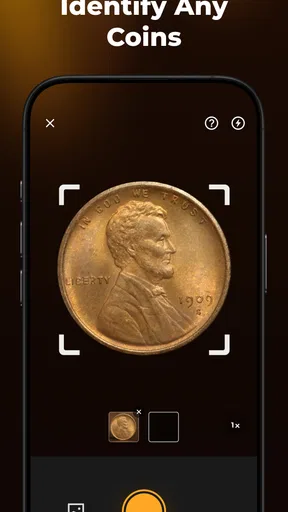
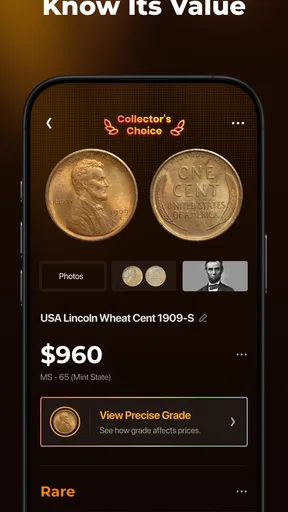
Once you're in, the app asks for permission to access your camera. This is where the magic happens. Just point your camera at a coin, snap a picture, and let the app do its thing. Within seconds, you get a detailed analysis of the coin, including its origin, year of minting, and even its estimated value. I was genuinely impressed by the speed and accuracy of the information provided.
The practical trick is to make the photo do as little guesswork as possible. I place a coin on a plain, steady surface, move other objects out of the frame, and check that the date and lettering are visible before scanning. If the first result seems odd, I take another image rather than accepting it simply because the app returned an answer quickly. That small pause matters: an identification tool can only work with what the camera can see, and glare, soft focus, wear, or an unusual angle can hide exactly the details that distinguish one coin from another.
For a casual user, this is a satisfying way to turn a pocketful of unfamiliar change into a quick learning session. For a collector sorting inherited coins, it can help create an initial list of things worth checking more carefully. I would not use a scan alone to decide that a coin is rare, sell it, or pay a premium for one. The value estimate is better treated as a clue for further research, especially when condition and authenticity could substantially affect what a buyer would actually pay.
From a fun first week to a useful routine
I look at the first week as a test of whether the quick scan is more than a novelty: does it help me make sense of a coin, or simply give me something to tap through? The answer depends on how I handle uncertain results and whether I turn the interesting finds into a small, useful record. From there, the bigger question is what keeps that routine worthwhile over time.
Features That Stand Out
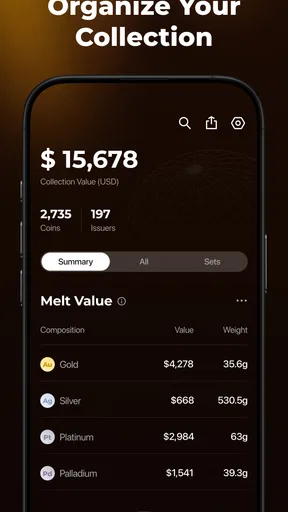
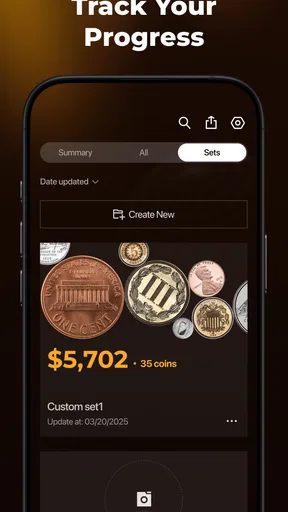
One of the features I absolutely love about CoinSnap is the extensive database. Whether it's a coin from the Roman Empire or a modern-day currency, the app seems to recognize them all. This is a game-changer for coin enthusiasts and collectors alike. Plus, it saves all the coins you’ve scanned in a personal collection, so you can easily track and organize your treasures.
Worth Reading Before You Choose

EA SPORTS FC Mobile 26 Is a Bigger Football Game, but It Takes Time

Flipboard Shows What News Apps Must Do Beyond the Feed

Switching to Android Auto Means Rethinking Your Driving Routine

Google Calendar Makes a Crowded Week Easier to Manage

Ludo King Makes the Most of the Minutes Between Plans

Baby Panda World Brings Quick Play to Modern Phones, but Its Game Library Feels Busy
The collection is where the app has a chance to earn a lasting place on your phone. Scanning once is entertaining; having a record you can return to is more useful. I’d use it to sort a small box into broad groups, then revisit uncertain entries after comparing the images and details with the physical coins. A simple habit helps: add a note for yourself about where a coin came from or why you kept it, rather than relying on memory weeks later. That turns a stack of scans into a more meaningful personal record without pretending the app is a specialist cataloging system.
A realistic use case is clearing out a relative’s jar of mixed coins. I’d photograph one coin at a time in a calm setting, separate confirmed matches from uncertain ones, and avoid making quick decisions based on the app’s estimated value. Later, I could take the uncertain or potentially important pieces to a knowledgeable dealer or collector for a closer look. CoinSnap is useful in that workflow because it reduces the effort of getting oriented; it does not remove the need for judgment when money or authenticity is at stake.
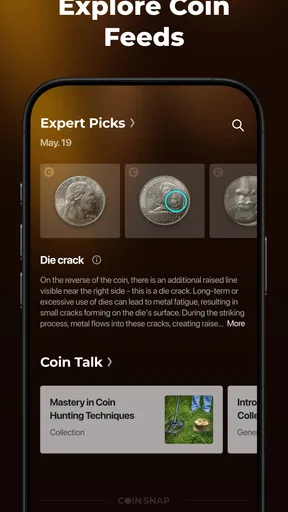
The app also offers a community feature, allowing users to connect with fellow coin collectors. You can share your finds, ask questions, and even trade coins. It's like having a global coin club at your fingertips. The social aspect adds a layer of engagement that keeps you coming back for more.
Community discussion can be a helpful second opinion, but I would still separate friendly conversation from verification. When asking about a coin, a clear image and the relevant details make it easier for others to respond usefully. I’d also be careful about treating a suggested trade or a confident comment as proof of value. The feature suits people who enjoy talking about their finds; if you only want a quiet reference tool and have no interest in sharing, it may add little to your routine.
Learning and Discovery
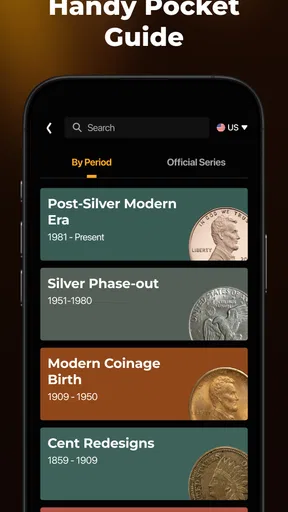
Another highlight is the educational content. CoinSnap doesn't just identify coins; it also provides fascinating historical insights. Each time I scanned a coin, I found myself diving into the rich stories behind it. This feature turns the app into a learning tool, perfect for history buffs and curious minds.
I found the historical angle most rewarding when I approached a scan with a question rather than treating it as a stream of facts. A coin’s place of origin or date can lead me to look more closely at its symbols, language, or design. For a parent or teacher, that can make an ordinary coin a quick prompt for a conversation about where it circulated and what its markings might mean. The app can spark that curiosity, but I would check important historical claims against a trusted reference before using them as the last word.
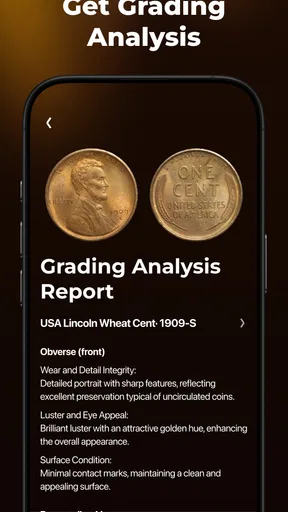
The app also offers insights into coin grading. If you're new to collecting, understanding the condition of a coin is crucial, and CoinSnap gives you a good starting point. While it’s not a replacement for a professional appraisal, it’s definitely helpful for those looking to expand their knowledge.
Grading is especially easy to misread when you are new to the hobby. I use an app’s condition guidance to learn what details to inspect, not to assume that a phone image captures every scratch, cleaned surface, or subtle difference in wear. Lighting can make marks look stronger or weaker than they are, and a photograph cannot convey every feature a careful in-person examination might reveal. For a beginner building vocabulary, the guidance can be educational; for a high-value purchase or sale, a specialist’s assessment is the safer choice.
What keeps it useful—and what wears thin
No app is perfect, and CoinSnap is no exception. While it performed well with most coins I tested, there were a few instances where it struggled with coins that were heavily worn or corroded. Additionally, while the app is free to download, some features are locked behind a subscription. This might be a downside for casual users who are just dabbling in coin collecting.
CoinSnap has a 4.5 average from around 104,000 ratings, and it has been installed over 10 million times, so it clearly appeals to a broad audience. Those figures do not change the practical question for me: does the app solve a recurring problem? If I scan coins only once in a while, the free experience may be enough, and paying for extras would be difficult to justify. The app includes in-app purchases ranging from $2.99 to $49.99 per item, so I’d check what a paid option actually unlocks and whether I would use it repeatedly before committing.
Compared with the usual alternatives, CoinSnap is more convenient than searching the web manually for every unfamiliar coin, particularly when I do not know the right terms to search. A general camera or image search can be a useful cross-check, while a printed numismatic reference or an expert is better when I need careful context, dependable grading, or confidence before a transaction. CoinSnap’s strength is the quick bridge between a physical object and an organized starting point, not replacing every specialist resource.
Maintenance is modest but real. A collection stays useful only if I keep entries organized and correct obvious misidentifications instead of letting an early guess become a permanent record. When I have a batch to sort, I would scan a few at a time, review the results before moving on, and keep uncertain coins separate. That is less tiring than trying to photograph everything in one sitting, and it reduces the chance of mixing up similar pieces. If maintaining a digital inventory feels like another chore, the collection feature may not earn regular use.
Another source of fatigue is repetition. Once the easy-to-identify coins have been scanned, the remaining pieces may be worn, damaged, or visually similar, which can make each attempt less satisfying. A weak result is not necessarily a reason to keep retaking the same picture indefinitely. I’d try one clearer image under even light, then set the coin aside for manual research if uncertainty remains. That boundary keeps the app helpful rather than turning a hobby session into a frustrating hunt for a perfect scan.
There is also the question of whether the app suits the way you collect. If you enjoy discovering what coins are and keeping a lightweight record, the camera-led approach is a natural fit. If you already maintain a detailed inventory in a spreadsheet or a dedicated reference system, another collection may mean duplicate work. And if you mainly need a firm valuation, a quick app estimate is not a substitute for checking comparable sales and getting an informed opinion on the specific coin’s condition.
Also, the app's reliance on an internet connection can be a limitation. If you're exploring remote areas or attending a coin show with spotty Wi-Fi, you might find yourself frustrated. Hopefully, future updates will offer more offline functionality.
CoinSnap is free to download, rated for Everyone, and its current version is 2.4.0; it was released on September 19, 2022, and requires Android 9 or later. That makes it approachable for many people, though the in-app purchase options are worth considering if you expect to use it often. I would not install it just because an old coin might someday turn up. I would install it if I regularly handle unfamiliar coins, enjoy learning their background, or want a convenient way to begin organizing a collection.
Final Thoughts
Overall, CoinSnap - Coin Identifier is a must-have app for anyone with an interest in coins. Its ease of use, comprehensive database, and engaging community make it a standout in the world of numismatics. Whether you're a seasoned collector or a curious beginner, CoinSnap provides a wealth of information and a fun way to explore the world of coins.
My longer-term verdict is a little more selective: I think it earns its space most easily for curious beginners and casual collectors who will scan coins more than once and enjoy building a record over time. A specialist collector may still prefer established references and expert advice for consequential decisions, while someone with only one coin to identify may find a manual search sufficient. I’d keep CoinSnap as a convenient companion, not as the authority that settles every question.
So next time you stumble upon an old coin, don’t just toss it in a drawer. Whip out your phone, fire up CoinSnap, and dive into a world of history and discovery. Who knows, you might just find your next favorite hobby!
Pros
- Accurate coin recognition using AI.
- Supports a wide range of coin types.
- User-friendly interface for easy use.
- Includes detailed coin history information.
- Regular updates enhance coin database.
Cons
- Requires internet connection for use.
- Limited features in free version.
- Occasional misidentification of rare coins.
- Subscription model can be costly.
- Ads can be intrusive during use.
FAQs for CoinSnap - Coin Identifier
What is CoinSnap and how does it work?
CoinSnap is a mobile application designed to help users identify and value coins using advanced image recognition technology. By simply taking a clear photo of a coin, the app analyzes its features and provides detailed information about its origin, history, and current market value. This makes it an invaluable tool for collectors and enthusiasts.
Is CoinSnap free to use, or are there any hidden costs?
CoinSnap offers both a free version and a premium subscription. The free version includes basic features such as coin identification and limited access to the database. However, for more detailed insights, historical data, and unlimited identification, users may opt for the premium version, which requires a subscription fee.
Can CoinSnap identify coins from all countries and historical periods?
CoinSnap boasts a wide database that includes coins from various countries and historical periods. However, its accuracy may vary depending on the rarity and obscurity of the coin. The app is continuously updated to include more coins, but it might not identify extremely rare or newly minted coins immediately.
How accurate is CoinSnap in identifying coins?
CoinSnap uses cutting-edge image recognition technology to provide a high level of accuracy in coin identification. While it performs well with common and moderately rare coins, the accuracy can decrease with highly unique or damaged coins. Users are encouraged to use clear, well-lit photos for the best results.
What should I do if CoinSnap fails to identify a coin?
If CoinSnap fails to identify a coin, ensure the photo is clear and taken in good lighting. If the issue persists, try retaking the picture from different angles. You can also reach out to their support team for assistance or check if your coin is part of the latest database updates.


